Configuring Local LLM Inference with Ollama for Data-Sensitive Workflows
Learn the configuration settings that keep sensitive data on your own machine.
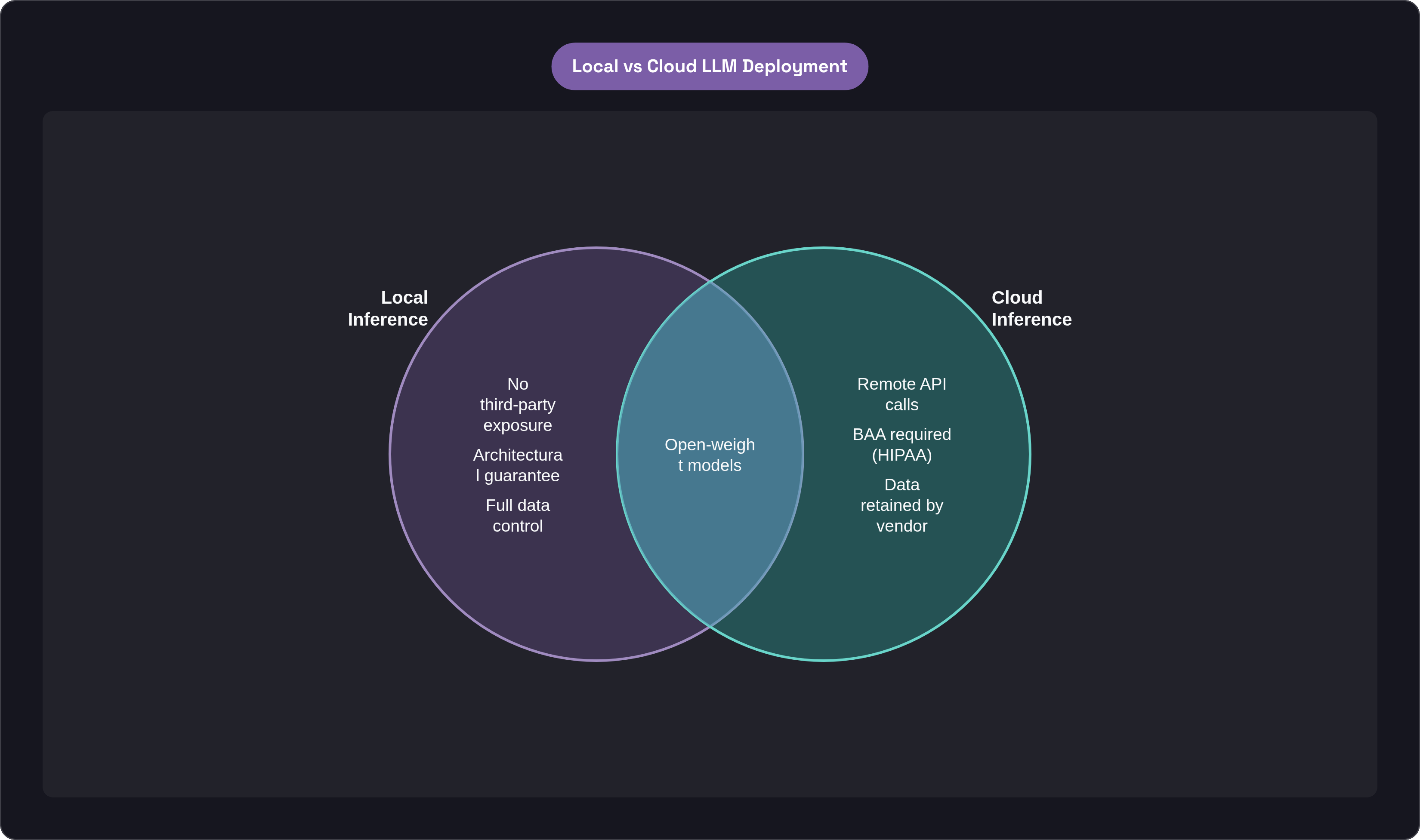
Ollama runs open large language models on your own machine, and configuring it correctly means sensitive data never has to leave that machine at all. This piece walks through the specific settings, from network binding to model choice to runtime variables, that turn "it should be private" into something you can actually verify with a packet capture. The distinction matters more than it sounds: a policy says a vendor won't use your data; an architecture makes it structurally impossible for that data to go anywhere. Ollama is the path for teams that want to run that same architectural principle entirely on their own hardware. Ollama, when configured deliberately, gives you the second kind of guarantee. Configured carelessly, it gives you neither.
Ollama itself is a runtime and package manager for open models. One command pulls a model, and Ollama handles the weights, memory allocation, and serving, wrapping llama.cpp behind a REST API so you don't have to think about quantization formats or GPU memory math by hand. The server listens on localhost:11434, using an OpenAI-compatible endpoint, so tooling built for cloud APIs generally works without rewrites. It runs on macOS, Windows, and Linux, and as of mid-2026 supports Llama, Gemma, Mistral, Qwen, DeepSeek, and other open model families. After the model downloads, a packet capture during inference should show zero outbound traffic. Prompts, outputs, and history stay local. That's the architectural claim, and it's testable, which is the whole point.
One wrinkle worth flagging up front: Ollama's library now includes models tagged "-cloud," which run on datacenter infrastructure rather than your machine. Pull one of those by mistake and the local-only guarantee is gone, silently. The tag difference is easy to miss in the model list. Keep that in mind as we go, because it resurfaces in the model selection section below.
Why regulatory and legal context makes deliberate configuration necessary
Under GDPR, a cloud LLM provider processing prompts that contain personal data is a data processor under Article 28, which means a Data Processing Agreement is required before that data can legally flow to the provider. Local inference removes the question entirely, along with the Article 46 transfer mechanisms that come into play whenever data crosses borders. There's no processor, so there's no agreement to negotiate and no transfer to justify.
HIPAA raises the stakes further. Send protected health information into a cloud LLM prompt, and the provider handling that prompt becomes a Business Associate under the law. Without a signed Business Associate Agreement, that API call isn't a technical risk sitting in some future audit; it's an unauthorized disclosure the moment it happens. Standard API tiers from major providers don't come with BAAs attached, and even enterprise agreements can retain submitted data for weeks by default. Fully on-premises deployment is the only architecture where no third party sits in the inference path at all, which makes it the only configuration where the answer to "do we need a BAA" is simply no.
The EU AI Act, effective February 2025, adds another layer. AI systems processing personal data in healthcare, HR, legal, and financial contexts are classified high-risk, and for organizations in those sectors, local inference is the lowest-risk deployment path available under the regulation.
There's a subtler complication too, and it's one that surprises people who assume "delete the data" is always an option. EU data protection authorities clarified in 2025 that personal data embedded in a model's weights during training can't simply be deleted on request; removing it requires retraining the model. That's a strange fact to sit with. It means the "right to be forgotten" doesn't map cleanly onto a trained model the way it does onto a database row. Local deployment with a model you control, and ideally one you know the training provenance of, is the only realistic way to manage that exposure.
None of this makes any LLM "HIPAA-compliant" on its own; no such certification exists for any piece of software, full stop. Compliance is a property of the whole system, not a checkbox on a model card. That's exactly why the configuration choices in the rest of this article matter as much as they do.
Choosing hardware that supports the workload without compromising isolation
VRAM is the number that decides everything else. When a model fits entirely inside GPU memory, Ollama loads all its layers there and runs at full speed. When it doesn't, the excess layers spill over to system RAM across PCIe, and throughput drops off a cliff. This isn't a minor slowdown; it's the difference between a model that feels responsive and one that feels broken.
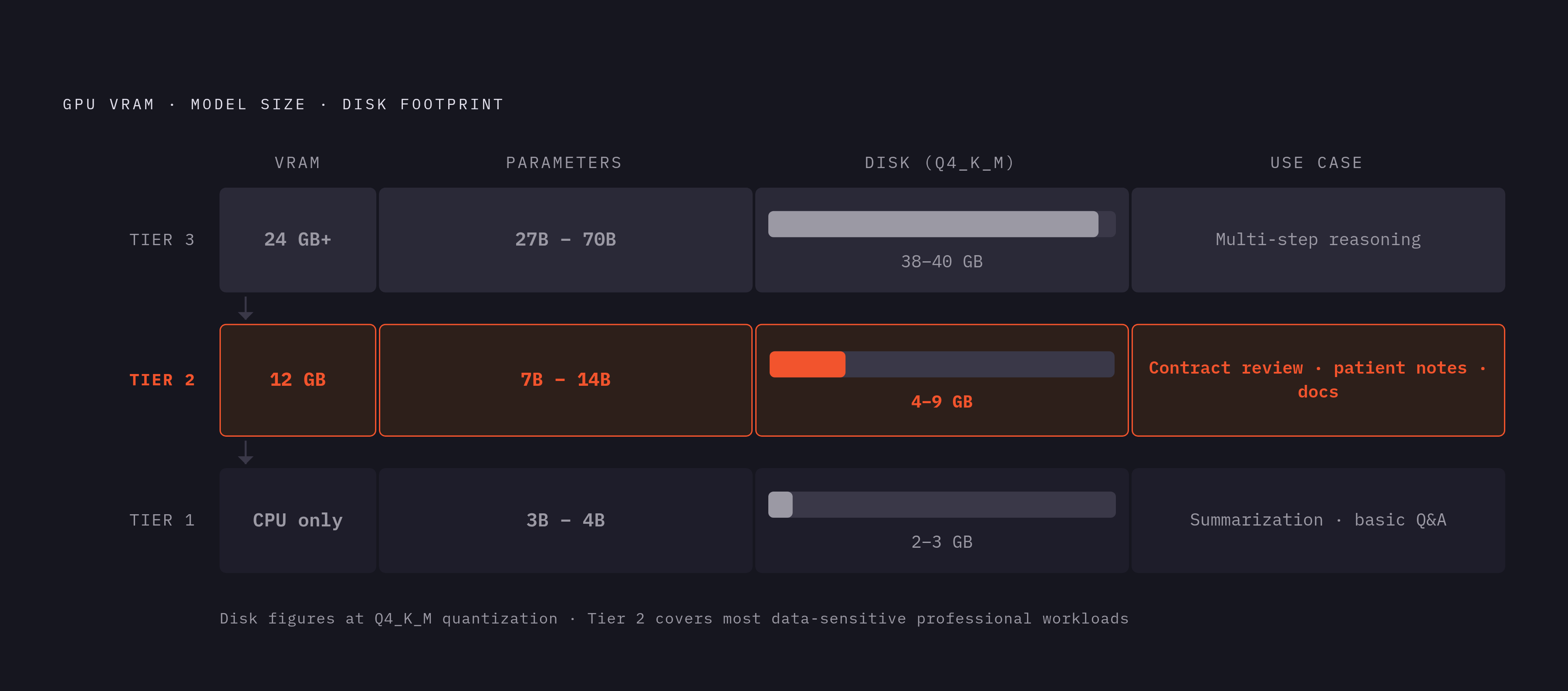
The floor is modest: 8 GB of system RAM, meaningful free disk space, and a 64-bit CPU with AVX2 support. No GPU is strictly required, though CPU-only inference is considerably slower. From there, three practical tiers cover most real deployments. On the low end, CPU-only setups or laptops with limited VRAM handle 3B to 4B parameter models reasonably, which is enough for summarization and straightforward Q&A. A mid-range GPU, something around 12 GB, opens up 7B to 14B models at comfortable speed, and this is genuinely the sweet spot for most data-sensitive professional work: contract review, internal documentation, patient-note summarization. High-end setups, 24 GB or more, or dual-GPU rigs, are where 27B to 70B models become usable, and those are the tier you need for complex, multi-step reasoning tasks.
Apple Silicon deserves a specific mention here because its unified memory architecture changes the math. All system RAM is accessible to the GPU with no copy overhead, so a Mac with 32 GB of unified memory can run models that would demand 32 GB of dedicated VRAM on a discrete-GPU PC. The MLX backend, added in Ollama v0.30, improves throughput further on M-series chips. It's a genuinely different cost curve than the discrete-GPU world, and worth weighing before assuming you need a workstation-class card.
Quantization is what makes any of this affordable in the first place. Ollama's default, Q4_K_M, shrinks a model roughly fourfold compared to FP16 (and about eightfold against FP32), with only a minor hit to output quality. A 7B model lands around 4 to 5 GB; a 70B model around 38 to 40 GB. Worth knowing, too: Ollama defaults to a 2,048-token context window, and the KV cache grows linearly as context gets longer. For document-heavy workflows like retrieval-augmented generation, that default silently truncates retrieved chunks with no error message at all. It just quietly drops information. We'll come back to fixing that in the runtime settings section, because it's an easy thing to miss until an answer comes back subtly wrong.
On the GPU platform side: NVIDIA needs CUDA compute capability 5.0 or higher, AMD needs ROCm on Linux, and Apple Silicon uses Metal automatically with no configuration. AMD support has gotten meaningfully better, but NVIDIA still gets more optimization attention from the ecosystem at large.
Selecting a model appropriate for data-sensitive tasks
Open-weight models under permissive licenses are the only real option here. Anything proprietary, or anything that depends on a remote API call to function, reintroduces the exact third-party exposure the entire local setup exists to eliminate. If the model needs to phone home to run, you haven't actually solved the problem, you've just moved it one layer down.
As of mid-2026, a handful of options cover most use cases well. Qwen 3.6 27B offers strong general and coding performance and fits on a 24 GB GPU at Q4 quantization, making it a solid default for teams that need a capable generalist without a large hardware budget. DeepSeek R1, along with its distilled variants, is built for chain-of-thought reasoning; the R1-0528 update pushed math accuracy from 70% to 87.5% on the AIME 2025 benchmark and cut hallucination rates by roughly 45%. The smaller distilled versions, at 7B and 14B parameters, now handle reasoning tasks that used to require much larger models, which puts real reasoning capability within reach of mid-range hardware. Gemma 4, released in April 2026 under Apache 2.0 by Google DeepMind, ranked third on the Arena AI leaderboard at launch with its 31B dense model. For engineering teams worried about proprietary code leaving the building, Qwen2.5-Coder is a dedicated code model with a long context window, keeping an entire codebase's context local. And Llama 3.3 70B remains a strong general-purpose baseline for teams with the hardware to run something that size.
Honesty matters here: 7B to 14B models hold up well against cloud APIs on summarization and straightforward Q&A, but complex, multi-step reasoning still shows some gap against the largest cloud models. That gap has narrowed substantially, though, and models like DeepSeek R1, Qwen 3, and Llama 4 have closed much of the distance to GPT-4-class performance. It's not nothing, but it's a smaller tradeoff today than it was even a year or two ago.
The cloud-tag warning from the opening section belongs here too, because this is where it actually gets applied. Before pulling any model, check that its tag doesn't end in "-cloud." It's the single most important step in the entire model-selection process for anyone building a data-isolated deployment, and it takes about five seconds to check. While you're at it, confirm the model's license actually permits your intended use. Not every open-weight license clears the way for commercial or healthcare deployment, and that's worth reading before, not after, you've built a workflow around it.
Binding Ollama to localhost and controlling network exposure
By default, Ollama binds to 127.0.0.1 on port 11434, accepting connections only from processes on the same machine. This is the safe default, and there's rarely a good reason to change it without thinking hard first.
Here's where things go wrong. Setting the OLLAMA_HOST environment variable to 0.0.0.0 opens the server to every network interface on the machine, and Ollama has no built-in authentication whatsoever. Anything that can reach the port is treated as fully trusted, no questions asked. Internet-wide scans conducted through 2025 and 2026 have turned up large numbers of Ollama servers listening on public IP addresses, and in most cases the cause was mundane: a developer set 0.0.0.0 to reach the server from a second device on their network, and never closed the port back up afterward.
If you genuinely need network access, say, a shared inference server for a small team on an internal LAN, there's a safer path. Bind to a specific internal interface IP rather than 0.0.0.0. Firewall the port at the OS or network level, restricting it to a known IP range. And never, under any circumstance, expose port 11434 directly to the public internet.
OLLAMA_HOST is the single control point for all of this, so set it explicitly in the systemd unit file on Linux or the launchd plist on macOS, rather than trusting a shell profile setting to persist across restarts or updates. It often doesn't. After configuring it, verify the actual binding rather than assuming the setting took. Running something like ss -tlnp or netstat will show you exactly what address the server is listening on, and that five-second check has caught more than a few misconfigurations that looked correct on paper.
Adding API access controls in front of the unauthenticated endpoint
Ollama ships with no API key system, no login, no token of any kind. That's a known design gap in the tool, not a mistake someone made in setup.
The standard fix is a reverse proxy, nginx or Caddy, sitting in front of port 11434. The proxy handles TLS termination, enforces basic auth or a bearer token, and logs requests. Ollama itself never leaves localhost; the proxy is the only thing exposed, even on an internal network. A minimal nginx configuration might look something like this:
location /api/ {
    auth_basic "Restricted";
    auth_basic_user_file /etc/nginx/.htpasswd;
    proxy_pass http://127.0.0.1:11434/;
}
Separately, the OLLAMA_ORIGINS variable controls which origins are allowed to make cross-origin requests to the API. Set it explicitly rather than leaving it wide open, so a browser tab running unrelated JavaScript can't quietly hit your local endpoint.
For team or multi-user deployments, a lightweight API gateway like LiteLLM's proxy adds per-user keys, rate limiting, and audit logging, none of which Ollama provides on its own. That audit logging isn't a nice-to-have if the deployment falls under HIPAA or GDPR scope: access logs showing who queried the model and when are part of the audit trail regulators expect, and the reverse proxy layer is where those logs actually live.
Worth being clear about what access controls don't do. They stop unauthorized requests from reaching the server, but they do nothing to encrypt model weights or prompt history sitting on disk, and they don't isolate one user's process from another's on a shared machine. Those are separate problems, and they get their own sections below.
Runtime environment variables that affect data handling
A handful of environment variables quietly shape how much data Ollama retains and where it sits. Most of them are opt-out by default, which is backwards from a privacy standpoint, so reviewing each one explicitly is worth the ten minutes it takes.
OLLAMA_KEEP_HISTORY controls whether interaction history gets logged to a plaintext file, typically at ~/.ollama/history on macOS and Linux, readable by any process running as the same user. Setting it to false disables that logging. This one's easy to miss, because nothing in the default experience suggests a plaintext log is being kept at all.
OLLAMA_NUM_CTX overrides the default 2,048-token context window mentioned earlier. For RAG workflows or anything involving long documents, raise it substantially. Skip this and retrieved chunks get silently dropped, which produces answers that are subtly wrong with no error to flag the problem.
OLLAMA_NUM_GPU sets how many layers load onto the GPU; setting it to 0 forces CPU-only inference. That matters on shared hardware where the GPU itself might be accessible to other processes or users, and keeping model data off it entirely is a deliberate isolation choice, not just a performance one.
OLLAMA_MODELS sets the directory where model weights actually live on disk. Point it at an encrypted volume, LUKS on Linux or a FileVault-protected volume on macOS, so the weights and any cached state are protected if the disk itself is ever compromised or the machine is lost. And OLLAMA_FLASH_ATTENTION enables flash attention for better memory efficiency on long contexts, which becomes relevant the moment you've raised the context window and want to avoid running out of memory on mid-range hardware.
Set all of these in the service unit file, not a shell profile. On Linux that's the systemd unit; on macOS it's the launchd plist. Variables set in a shell profile only apply if the service happens to start from that shell, which it often doesn't after a reboot or an update. The underlying principle running through all of this: every default that persists data or opens a network surface deserves a deliberate look. The safe posture is opt-in to logging and exposure, not opt-out of it.
Prompt history, data at rest, and process isolation on multi-user systems
Even with history logging switched off, other processes running under the same OS user account can, in principle, read into Ollama's memory space. On a shared system, that's a real gap. The fix is running Ollama as a dedicated service user with permissions restricted to only what it needs, rather than under a general-purpose account other software also uses.
Model weights themselves are large files sitting on disk, and if the machine could be physically accessed by someone else, whether that's a shared workstation or a laptop that leaves the office, storing OLLAMA_MODELS on an encrypted volume matters. It's a small extra step at setup and a significant difference if the hardware is ever lost or stolen.
On memory-constrained systems, the OS may page model data or prompt context out to swap space. If the data involved is sensitive enough to warrant it, encrypting swap, or disabling it outright, is worth the performance cost. That raises an important question: how sensitive is sensitive enough to justify a slower machine? There's no universal answer, but the decision should be made on purpose, not by default.
Multi-user isolation is where Ollama's simplicity becomes a limitation. Its single-server model doesn't natively separate one user's queries from another's, which means context from one session can, through the KV cache, bleed into another. For strict data separation, whether that's separating different users or different data classification levels, the answer is to run separate Ollama instances rather than trying to share one. It's less efficient, but it's the only way to guarantee the boundary holds.
Running Ollama inside a container, Docker or Podman, with explicit volume mounts and no host network access, adds one more layer of isolation on top of all this, and it has the side benefit of making the data boundary explicit and easy to audit later. Anyone reviewing the deployment can look at the container config and see exactly what it can and can't touch.
Testing the configuration before sending any sensitive data through it
None of the configuration above means anything until it's actually verified. Assumptions are how misconfigurations survive for months.
Start with network traffic. Run a packet capture, tcpdump or Wireshark, during an actual inference request and confirm nothing leaves the machine. This is the same test that backs up the architectural privacy claim in the first place, and it should be run fresh on every new deployment rather than assumed to hold from one machine to the next. Then check port exposure from outside: from a second device on the network, a simple curl or nmap scan against port 11434 will immediately show whether the binding is actually restricted the way you think it is.
If a reverse proxy with authentication sits in front of the API, send an unauthenticated request and confirm it gets rejected with the expected status code, rather than quietly passing through. Test the context window fix too: send a prompt that exceeds 2,048 tokens and check that the full context comes back correctly, confirming OLLAMA_NUM_CTX actually took effect rather than chunks getting silently cut. After setting OLLAMA_KEEP_HISTORY to false, run a test prompt and check the history file is empty or missing entirely.
Last step, and arguably the simplest one to skip by accident: run ollama list and check every model on the system. Confirm none of them carry a "-cloud" tag. One command, and it closes the loop on the exact issue raised at the start of this piece. Configuration is only as good as the last time someone bothered to check it still holds, and that's as true here as anywhere else in security work.